Mini Lathe vs Mini Mill: Which One Should You Buy?
The VEVOR 7x14 lathe and the MAKERA Carvera Air mill take different sides of the same bench job: turning round stock against milling flat stock, pockets and engraving.

On this page
Top picks at a glance
As an Amazon Associate I earn from qualifying purchases.
- 1
 VEVOR 7"x14" Metal Lathe9.4/10View on Amazon
- 2
 Carvera Air Desktop CNC with 4th Axis Rotary Kit9.4/10View on Amazon
Verdict. Pick the VEVOR lathe when the work is round stock that needs turning, and pick the MAKERA mill when the work is flat stock, pockets, carving or engraving. The lathe listing states more of its core figures, while the mill listing states more automation, so the lathe ranks first here and the mill follows close behind.
A small part on the bench can go either way: round stock that needs turning, or flat stock that needs pockets, slots and engraving. A mini lathe vs mini mill choice comes down to that shape, and the two listings here make the split clear. The VEVOR machine is a benchtop lathe built around a chuck and a tool post, while the MAKERA machine is an enclosed desktop mill built around software, a quick tool changer and a rotary axis kit. This comparison puts the two listings side by side on what each one states.
WeldGearLab gets a commission on purchases made through links on this page, and your price stays the same. Read our affiliate disclosure.
The Two Machines
VEVOR 7"x14" Metal Lathe
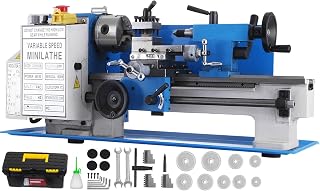
A 550W benchtop metal lathe with a digital display, a 4-inch 3-jaw chuck, a 4-way quick change tool post and a 7.09 in swing over bed.
Pros
- 550W motor; the bullets list a 50 to 2500rpm range on a digital display, while the title lists 2250RPM
- 7.09 in swing over bed and 13.78 in center distance
- 4-inch 3-jaw chuck and 4-way quick change tool post that holds 4 standard turning tools at once
- Metal gear, aluminum handwheel, automatic power-off protection switch and an extra LED lamp
Cons
- 103.0 lb in its table, heavy for a benchtop machine
- No warranty term is stated
- Through-hole size is called large but no figure is stated
Carvera Air Desktop CNC with 4th Axis Rotary Kit
An enclosed desktop CNC mini mill with a 4th axis rotary kit, a quick tool changer, auto-probing and leveling, and a spindle rated from 0 to 13,000 RPM.
Pros
- Closed-loop spindle control from 0 to 13,000 RPM with spindle runout under 0.01mm
- Quick tool changer switches tools in 10 seconds
- 4th axis rotary work area of 3.6 in diameter x 7.9 in length (9.2cm x 20cm) for cylindrical machining
- Auto-probing and leveling, plus Makera CAM software over WiFi or USB
Cons
- No power figure is stated for the spindle
- No weight is stated
- No warranty term is stated
- Main work area is not stated, only the 4th axis rotary work area
Other welders and gear to compare
 VEVOR Mini Metal Lathe 8"x14" Compact Lathe Machine 2250 PRMCheck price on Amazon
 7"x14" Benchtop Mini Metal LatheCheck price on Amazon
 VEVOR Metal Lathe 7 x 12 inCheck price on Amazon
 Metal Lathe 7" x 14"Check price on Amazon
Side by side
| Product | Power | Speed | Work capacity | Tool change | Weight | Warranty |
|---|---|---|---|---|---|---|
| VEVOR 7×14 Metal Lathe | 550W | 50 to 2500rpm in bullets; title lists 2250RPM | 7.09 in / 180mm swing over bed; 13.78 in / 350mm center distance | 4-way quick change tool post | 103.0 lb | Not stated |
| MAKERA Carvera Air | Not stated | 0 to 13,000 RPM, closed-loop | 4th axis rotary work area 3.6 in diameter x 7.9 in length (9.2cm x 20cm) | Quick tool changer, 10 seconds | Not stated | Not stated |
Treat the specs as maker ratings pulled straight from the listings; we gathered them on 13 November 2026. Neither listing states a safety listing or a warranty term.
Mini Lathe vs Mini Mill: What Each Machine Does
The VEVOR machine is a lathe: the work spins in a chuck and a fixed tool cuts it, which suits round parts such as shafts and bushings. The MAKERA machine is a mill: the tool spins and moves over fixed work, which suits flat parts, pockets, slots, carving and engraving. That split is the whole decision: the lathe is built for turning round work, the mill is built for cutting flat work, and the mill does its round work through the 4th axis rotary kit rather than by turning between centers.
Speed and Control
The VEVOR lathe is rated at 550W, and its listing gives two different top speeds: the title lists 2250RPM while the bullets list a range of 50 to 2500rpm on a digital display. The listing leaves the top speed unclear. The MAKERA mill states closed-loop spindle control from 0 to 13,000 RPM with spindle runout under 0.01mm, and auto-probing and leveling for calibration on uneven material. The mill gives no power figure, so the two cannot be compared on power.
Size and Work Area
The lathe states a 7.09 in swing over bed, given as 180mm, and a 13.78 in center distance, given as 350mm, which sets the size of round work it can take. The mill states no main work area at all, only the rotary work area of its 4th axis kit: 3.6 in diameter by 7.9 in length, given as 9.2cm by 20cm, for cylindrical machining, double-sided objects and 3D shapes. The two listings state different kinds of capacity, so there is no shared figure to compare here.
Tool Changes and Setup
The lathe uses a 4-way quick change tool post that can install 4 standard turning tools at the same time, with adjustors that move the post forward and back on accurate scales. The mill uses a quick tool changer that switches tools in 10 seconds. The lathe also names a 4-inch 3-jaw chuck that handles square and round objects, while the mill listing names auto-probing and leveling and no chuck. Setup on the mill runs through Makera CAM software over WiFi or USB, and the controller supports iOS, Android, Mac OS, Windows and Linux, with Fusion360, SolidWorks and VCarve Pro named as supported tools.
Weight and Build
The lathe lists its weight as 103.0 pounds in its table and its size as 34.1 inches by 13.6 inches by 17.7 inches, a benchtop footprint in blue and white. Its build points are a metal gear instead of a nylon one, an aluminum handwheel, and an automatic power-off protection switch, plus an extra LED lamp for dim work areas. The mill listing states no weight and no dimensions, so the two cannot be compared on size or heft.
What Is in the Box
The lathe title names a precision tool box with the machine. The mill scope of delivery names the Carvera Air desktop CNC machine in its 4th axis version, one accessory kit, one tool kit, one material kit and one set of user guides.
Warranty
Neither listing states a warranty term, so neither machine earns warranty points here. The lathe listing does state an automatic power-off protection switch, which is a safety feature rather than a warranty.
Choose the VEVOR 7×14 Metal Lathe if
- Round parts are the main work: shafts, bushings and turned fittings.
- A stated power figure, swing and center distance matter more than software control.
- A 4-inch 3-jaw chuck and a 4-way tool post suit the jobs on the bench.
- A benchtop machine with a stated weight of 103.0 pounds fits the shop.
Choose the MAKERA Carvera Air if
- Flat parts, pockets, carving and engraving are the main work.
- A 4th axis for cylindrical machining and double-sided objects is part of the plan.
- Tool changes in 10 seconds and auto-probing and leveling matter for multi-step projects.
- Software control over WiFi or USB, with Makera CAM software, suits the workflow.
Before You Strike an Arc
- Wear eye and face protection before any spindle turns, and keep guards in place.
- Clamp the work firm, and on the lathe check the chuck and the 4-way tool post before cutting.
- Keep gloves away from rotating parts on the lathe and the mill.
- Check the box on arrival against the listing before switching on.
FAQ for welders
Should a hobby machinist buy a mini lathe or a mini mill first?
Buy the lathe when the parts are round stock that needs turning, such as shafts and bushings. Buy the mill when the parts are flat stock that needs pockets, slots, carving or engraving.
What size work can the VEVOR 7×14 lathe handle?
The listing states a 7.09 in swing over bed, given as 180mm, and a 13.78 in center distance, given as 350mm. Those two figures set the size of round work it can take.
What does the 4th axis add to the MAKERA Carvera Air?
The 4th axis kit adds a rotary work area of 3.6 in diameter by 7.9 in length, given as 9.2cm by 20cm, for cylindrical machining, double-sided objects and 3D shapes.
How fast does the MAKERA Carvera Air change tools?
The listing states the quick tool changer switches tools in 10 seconds. The lathe listing states no tool change time, so the two cannot be compared on that figure.
Can the VEVOR lathe run at 2250RPM or 2500rpm?
The listing disagrees with itself: the title lists 2250RPM while the bullets list a range of 50 to 2500rpm. The top speed is unclear until the maker confirms it.
Related: drill press vs mill, carbide vs HSS end mill, and bench grinder vs belt grinder for metal.
Scoring, line by line
Both machines are scored out of 10 on performance, build, value, safety listing and warranty, with the weights published on the How We Pick page.
| Product | Gear Score | Perf. /35 | Build /25 | Value /25 | Safety /10 | Warranty /5 |
|---|---|---|---|---|---|---|
| VEVOR 7×14 Metal Lathe | 9.4 | 28 | 21 | 20 | 0 | 0 |
| MAKERA Carvera Air | 9.4 | 28 | 20 | 20 | 0 | 0 |
Think of 9.2 as the bottom and 9.8 as the top. Totals are placed between them in proportion, which keeps the order intact: more points, higher score.